
5.1
Release Date: January 08, 2026
This release introduces significant updates to our AI Auto Review engine, focusing on cost transparency, user autonomy, and jurisdictional control. Updates include:
- Skipped Documents Tab
Users can now view and manage documents that were skipped during the creation of a new Auto Review Phase, the addition of documents to an existing phase, or the initiation of an Auto Review process. These skipped documents are located in the Skipped tab within each Auto Review Phase of the Batches Module.

For more details, see Skipped Documents.
- Auto Review Cost Safeguards
We have now removed the need to contact Customer Success when an Auto Review batch exceeds cost limits.
When a user initiates an Auto Review, Canopy now automatically skips any documents that would cause the process to exceed the cost limits outlined in the Agreement. These documents are redirected to a Skipped status to prevent unexpected charges.
You can view and manage these documents in the Skipped tab of the Batches module.
Next Steps for Skipped Documents:
- Manual Review: Re-batch the documents for human review.
- Auto Review: Re-batch the documents into a different Auto Review Phase if the pricing threshold permits.

- Review Fields Content Integration
The Auto Review engine now includes the Review Fields content in its review process. This upgrade allows the AI to verify and extract entities from document metadata, which often contains critical PII (Personally Identifiable Information).

- Auto Review Confidence Level
Canopy introduces Confidence Level to provide better insights into the Auto Review accuracy for each Auto Reviewed document.
- High (> 80%)
- Medium (50% – 80%)
- Low (< 50%)
For more details, see Auto Review Confidence Level.

- Auto Review Data Jurisdiction
To support global AI compliance and data residency requirements, users can now select the physical location for Auto Review AI.
- Available Regions: United States (US), Netherlands (NL), and Germany (DE).
- Region Transparency: The specific jurisdiction used for each Auto Review is now recorded in the Activity History for compliance reporting.

For more details on this feature, refer to the Auto Review documentation.
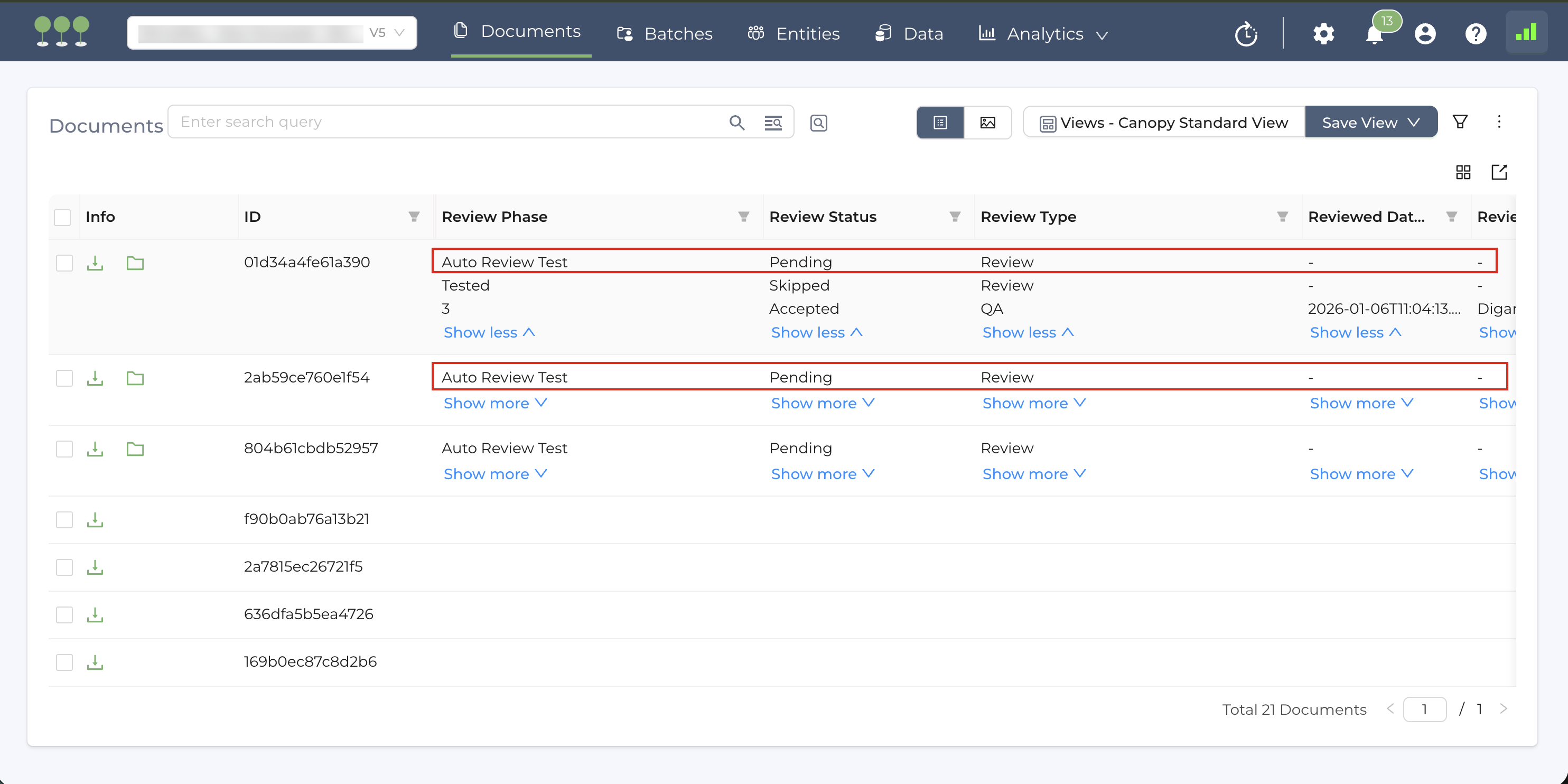
- Grouped Review-Related Columns
To simplify readability, we’ve grouped together Review-related column as a single functional group. When you modify the display settings for one of these columns, the entire group updates automatically.
- Visibility: Adjusting the visibility (Show more/Show less) for any Review-related field will cause the entire group to sync automatically.
- Data Alignment: As you read the Columns from left to right, the rows remain aligned.
The linked columns include:
- Review Method,
- Review Phase,
- Review Type,
- Batch,
- Review Status,
- Reviewed Date/Time,
- Reviewer Info.
This release introduces significant infrastructure improvements to our document export engine. We have optimized how Canopy handles large columnar file types, such as Excel (.xlsx, .xls), spreadsheets, and CSV files, to ensure faster exports and improved system reliability.
This release includes significant infrastructure improvements designed to ensure maximum integrity and security.